How to Share an Amazon Fresh Cart (2026)
TL;DR: Install AMZ Cart Share → Open your Amazon Fresh cart → Click the extension → Send someone your link. Your entire Fresh cart shared quickly and easily.
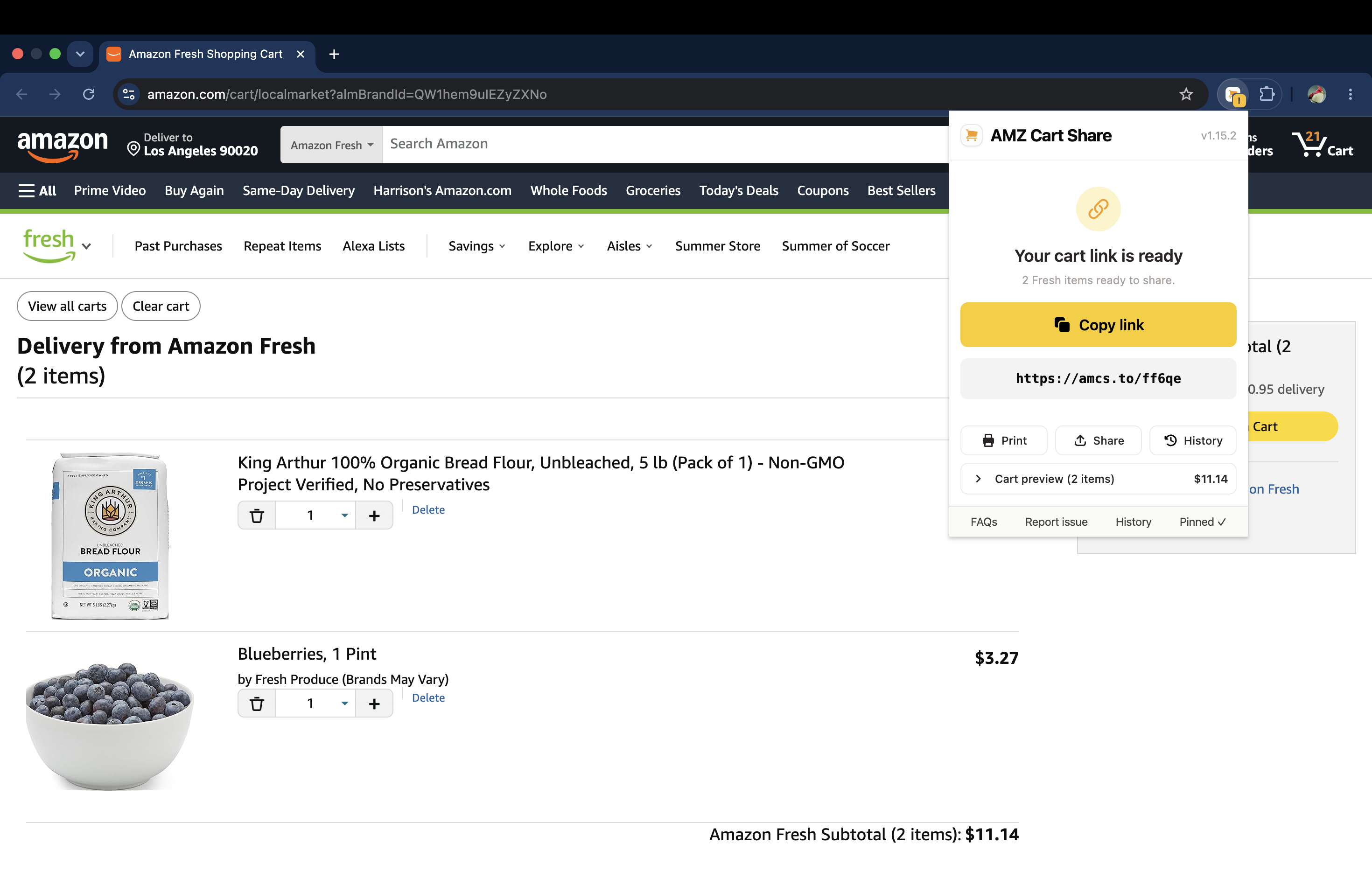
Sharing your Amazon Fresh grocery cart as a link using the AMZ Cart Share extension.
If you use Amazon Fresh for grocery delivery, you've maybe wanted to share your cart with someone before. Perhaps you're coordinating weekly groceries run with your partner, or sending a meal-prep list to a roommate.
The problem? Amazon doesn't offer a built-in way to share a Fresh cart.
The easiest solution is to use AMZ Cart Share, a free browser extension that now supports Amazon Fresh carts. In 1-click, you can share a link to your entire Fresh cart, including exact item quantities. The recipient can then add everything to their own cart without installing anything.
What is Amazon Fresh?
Amazon Fresh is Amazon's grocery delivery and pickup service. It offers a wide range of groceries, household essentials, and fresh produce, with same-day or next-day delivery available in select areas.
Amazon Fresh has its own cart that's separate from your regular Amazon cart. That's why you need an extension like AMZ Cart Share that specifically supports Fresh carts to share your grocery items.
How to Share Your Amazon Fresh Cart
Sharing your Amazon Fresh cart with AMZ Cart Share is simple. Just follow these steps:
- Install AMZ Cart Share. You can install AMZ Cart Share for Chrome or view extensions for other browsers. It also supports Edge & Firefox.
- Open your Fresh cart. Visit your Amazon Fresh cart page and click the AMZ Cart Share extension icon (top-right of your browser, click the puzzle icon if needed). The extension will pick up all your Fresh cart items and their quantities.
- Send your link. Copy your shareable cart link and send it to anyone. When the recipient clicks your link, they can view all your shared Fresh items and add them to their own cart in 1-click.
Done! The whole process is simple and takes less than a minute.
Why Share Your Amazon Fresh Cart?
There are plenty of reasons you might want to share a Fresh cart:
- Weekly grocery runs. Share your grocery list with a partner or spouse so they can review it, add anything you missed, or place the order themselves.
- Meal planning. Put together a cart with all the ingredients for a recipe and share it with friends who want to cook the same thing. You could even "share" it with yourself to save it for later, and make it easy to re-order the same items again.
- Household coordination. If you live with roommates, sharing a Fresh cart makes it easy to split up grocery ordering.
- Helping someone shop. Build a cart for a family member who isn't as comfortable ordering groceries online, and send them the link so they just have to check out and get the ingredients delivered.
FAQ
Does the recipient need to install the extension?
No. The person you share your link with does not need to install AMZ Cart Share. They just click your link, view the items, and add them to their own cart.
Does this work with Amazon Fresh in my country?
AMZ Cart Share works wherever Amazon Fresh is available. If you can load your Fresh cart in a browser, the extension can share it.
Can I also share my regular Amazon cart?
Yes! AMZ Cart Share supports regular Amazon carts, Amazon Fresh carts, and Whole Foods carts.
For a full guide on sharing a regular Amazon cart, check out How to Share an Amazon Cart.
What about Whole Foods carts?
AMZ Cart Share supports Whole Foods carts too. See our guide: How to Share a Whole Foods Cart on Amazon.
Conclusion
If you're looking for a quick and easy way to share your Amazon Fresh cart, AMZ Cart Share is the simplest option. It's free, takes seconds to use, and the recipient doesn't need to install anything.
Related Guides
- How to Share an Amazon Cart in 30 Seconds (2026)
- How to Share a Whole Foods Cart on Amazon
- Best Amazon Cart Sharing Extensions in 2026
- How to Share an Amazon Cart on iPhone or Android
About the Author
🙋♂️ Harrison Broadbent
Harrison is the founder/creator of AMZ Cart Share, a Chrome extension used by 12,000+ Amazon shoppers, schools, and businesses to share Amazon carts as links. He writes about ways to share, organize, and collaborate using shared Amazon shopping carts.