How to Share an Amazon Cart for Work, Purchasing & Approval
Table of contents
- Quick answer
- Why businesses need a better way to share Amazon carts
- Common business use cases
- Amazon purchase approval workflows
- Export the cart to a spreadsheet for budgets and purchase requests
- How to share an Amazon cart for work
- What the recipient sees
- Why this is better than copying product links
- Amazon Business vs AMZ Cart Share
- Is AMZ Cart Share safe for work purchases?
- When not to use AMZ Cart Share
-
FAQ
- Can I share an Amazon cart for work?
- Does the approver need to install the extension?
- Are item quantities included?
- Can I change my cart after sending the link?
- Can the recipient remove or change items before purchasing?
- Can I send an Amazon cart to my manager for approval?
- Can I export an Amazon cart to a spreadsheet for a budget or purchase request?
- Can I use AMZ Cart Share with Amazon Business?
- Is AMZ Cart Share free?
- What browsers does AMZ Cart Share support?
- Can I use this for remote employee setup?
- Related guides
Quick answer
To send an Amazon cart to someone at work for approval or purchase, use AMZ Cart Share.
Add the items you need to your Amazon cart, create a shareable cart link with the AMZ Cart Share extension, then send that link to whoever approves or places the order. That might be your manager, an executive, the office manager, or finance.
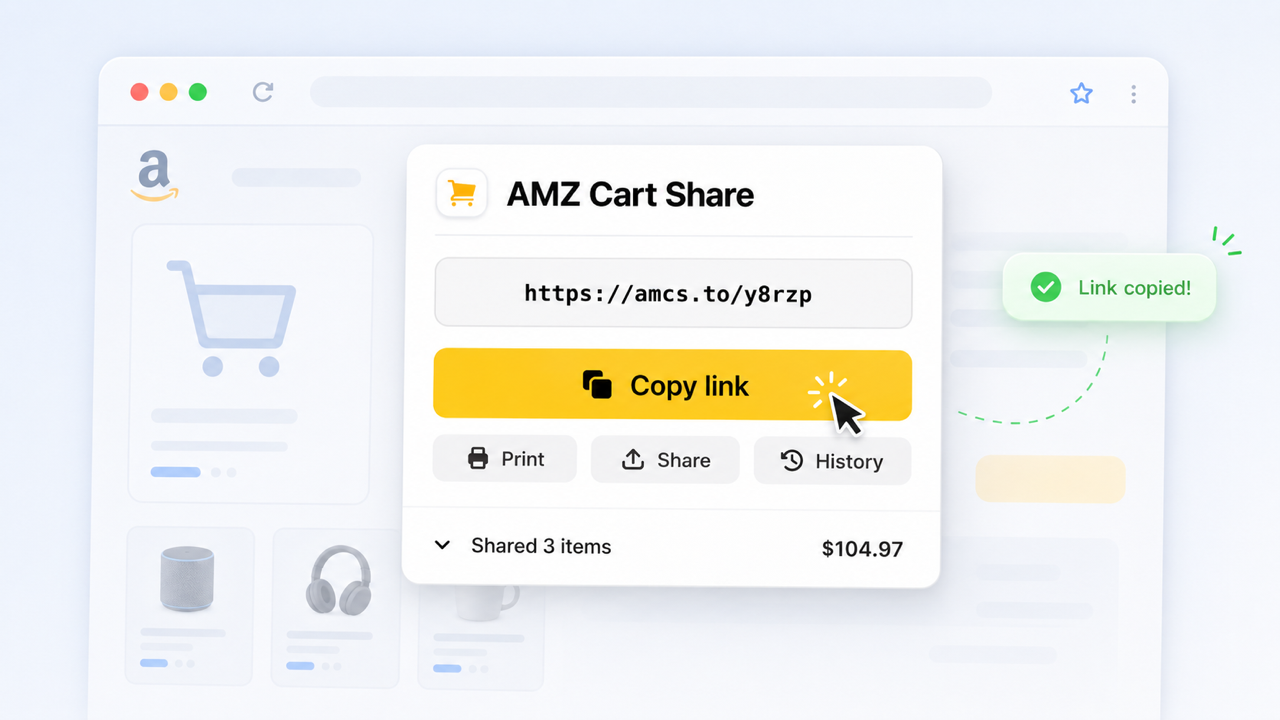
Share your entire Amazon cart as a link, and send it to managers within your workplace, with AMZ Cart Share.
The shareable link includes every item in your Amazon cart, plus the exact quantities. The person receiving the link does not need to install the extension. They can open your shared cart link, review the items, and add them to their own Amazon cart.
AMZ Cart Share is a lightweight handoff tool, not procurement software. If your organization needs formal approval chains and purchasing controls, Amazon Business is the better fit.
Click here to install AMZ Cart Share for Chrome
Why businesses need a better way to share Amazon carts
Work purchasing is often more annoying than it should be - one person knows what needs to be ordered, but someone else handles the purchase.
That might be an office manager, a finance person, an operations team member, or somebody else.
The painful part is getting the exact cart from the person who chose the items to the person who actually places the order.
Copying individual Amazon links sort of works for one or two items. But once you’re sending a full office supply order or a restock cart with 20 different products, it can get messy, quickly.
You end up with a giant Slack thread, a spreadsheet, screenshots, or a disparate set of email threads full of Amazon links.
It's also one of the most common reasons people share carts at all. In our analysis of 40,000+ carts shared with AMZ Cart Share, 88% of US carts were created on a weekday, mostly between 9am and 3pm. Tuesday was the busiest day, and sharing dropped 70% over Christmas week, when most offices are closed.
That’s where AMZ Cart Share helps - instead of sending a messy jumble of individual Amazon links, you send one simple cart link. For a full overview of all the methods, check out our complete guide to sharing your Amazon cart.
Common business use cases
AMZ Cart Share works well when one person builds the cart, but someone else needs to review, approve, or purchase it.
Some common scenarios include:
- Office supplies - like paper, pens, printer ink, folders, desk accessories
- Team equipment - like keyboards, monitors, webcams, headsets, laptop stands
- IT accessories - like USB hubs, adapters, hard drives, phone chargers, cables
- Break room restocks - like coffee, tea, snacks, cleaning products, paper towels
The receiver of your link can see all your shared items, plus the quantities are included, with dramatically less back-and-forth about which items need to be ordered.
Amazon purchase approval workflows
A regular Amazon account has no built-in way to request approval for a cart. In most workplaces, the "approval workflow" is really a handoff. One person picks the items, and another person reviews them and places the order.
AMZ Cart Share makes that handoff one link. The requester builds the cart, sends the link, and the approver reviews the exact items and quantities before buying from their own account. It doesn't enforce approval rules or spending limits. Those need Amazon Business or your internal purchasing system (see below).
Can an employee send an Amazon cart to a manager for approval?
Yes. The employee adds the items to their Amazon cart, creates an AMZ Cart Share link, and sends it to their manager with a short note about what the order is for.
The manager opens the link, reviews the items and quantities, and either places the order or asks for changes. A common example is a desk setup or equipment for a current project.
Changes are normal. Nearly half of AMZ Cart Share users share more than one cart, and often it's the same cart again with items swapped or quantities adjusted. Just send a fresh link after each revision.
How can an office manager send an Amazon purchase request to finance?
Build the restock cart once (stationery, break room supplies, cleaning products, shared office items), create a cart link, and send it to finance or operations along with the purchase request.
Finance sees the full list in one place, rather than piecing a request together from separate links. If finance wants a document to attach to the request, you can also print the Amazon cart or save it as a PDF, or export it to a spreadsheet.
Can a team coordinate Amazon purchases without sharing an Amazon password?
Yes. A cart link contains only the product IDs (ASINs) and quantities. It doesn't include account access, payment details, or order history.
Each person builds carts in their own account and sends links to whoever holds the company card or Amazon account. Nobody needs to share a login. See the security page for details on what the extension can access.
Export the cart to a spreadsheet for budgets and purchase requests
Sometimes finance doesn't want a link. They want a spreadsheet for a budget, a grant application, a reimbursement, or a purchase order.
AMZ Cart Export is our free companion extension. It exports your whole Amazon cart to a CSV file that opens in Excel or Google Sheets, with each item's title, ASIN, quantity, unit price, total cost, and product link.
"I was prepared to spend a couple of hours to retype my cart to create a budget for a grant. I was able to do it in minutes! Thank you!"
★★★★★, AMZ Cart Export user
The two extensions work together. Use AMZ Cart Share to hand off the cart itself, and AMZ Cart Export when someone needs the numbers in a spreadsheet. See how to export your Amazon cart to CSV or the AMZ Cart Export page to learn more.
How to share an Amazon cart for work
1. Add the work items to your Amazon cart
Start by adding everything you need to your Amazon cart.
Before creating your link, double-check that:
- The items + quantities are correct
- You’ve removed any personal items from your cart
- You’re using the right Amazon store for your location, such as Amazon.com in the US
Since your shared cart link reflects the cart when you create it, it's important to get these things correct before sharing.
2. Install the AMZ Cart Share extension
Install the free AMZ Cart Share extension for your browser.
AMZ Cart Share supports Chrome, Edge, and Firefox. You can start with the Chrome extension here:
Install AMZ Cart Share for Chrome
3. Open your Amazon cart
Go to your Amazon cart page.
This should be the cart with all the office supplies, equipment, restock items, or work-related products you want to send to someone else.
4. Create your shareable cart link
Click the AMZ Cart Share extension icon in the top-right of your browser.
If you don’t see it, click the puzzle-piece icon - 🧩 - in the top-right menu bar of Chrome to find your installed extensions.
Once you click the icon, AMZ Cart Share will automatically generate a shareable link containing the items in your cart, including the quantities you selected.
5. Send the link to your manager, approver, or purchaser
Copy the link and send it to whomever you need. This could be your manager, procurement head, office manager etc.
Since AMZ Cart Share generates a simple link, it's easy to share it via email, Slack, Microsoft Teams, a purchasing request form, a shared planning document, or your workplace's internal purchasing system.
You might also want to include a tiny bit of extra context, like the project or thing the cart is related to, whether it's urgent, or if any items are optional / required.
What the recipient sees
The person receiving your cart link does not need to install AMZ Cart Share.
When they open your link, they can view the items you shared and add them to their own Amazon cart.
Here’s an example cart page to give you an idea of what they’ll see.
They can review the full list before adding anything to cart, then either add individual items or all of them before completing the purchase on Amazon themselves.
This makes the handoff much cleaner - one person chooses the items, the cart link keeps the items + quantities together, and the receiver can review all the items before buying.
This is especially handy when purchases need to go through a central company account, company card, office manager, or finance person.
Why this is better than copying product links
Copying product links manually is fine for one or two items.
For any real workplace though, it gets old, and messy. If you copy links manually, you usually need to manually open & copy links, and format them into some sort of document or spreadsheet before sending them off. This is both time consuming and error prone - it's easy for you to forget to include something, or for the receiver to forget to add an item.
It’s even worse when you need multiples of certain items. You have to manually include the quantity info yourself and hope it doesn't get missed.
AMZ Cart Share solves this by making the cart itself the list - you build the order once in Amazon, then send it as one link. Everything is self-contained, and there’s less risk of items getting missed or forgotten.
Amazon Business vs AMZ Cart Share
Amazon Business is Amazon's purchasing platform for organizations, and it isn't really a competitor to AMZ Cart Share. If your organization needs formal purchasing, Amazon Business is the stronger tool.
Where Amazon Business is the better choice
Amazon Business is built for larger organizations that need:
- Formal approval workflows. Orders can be routed to one or more approvers before they're placed.
- Business accounts with multiple users. Many purchasers and requesters work under one organization.
- Purchasing policies and centralized controls. Spending limits, preferred suppliers, and restricted categories are managed by an administrator.
- Procurement reporting. Spend analytics and order reporting across the whole organization.
- Business purchasing features. Where available, these include pay-by-invoice, tax-exempt purchasing, and business pricing.
If your company already runs its purchasing through Amazon Business, use its native approval tools for formal requests.
Where AMZ Cart Share still helps
Plenty of work purchasing never touches formal procurement. AMZ Cart Share is useful for:
- Lightweight, occasional purchasing where setting up Amazon Business would be overkill
- One person assembling a cart for another person to review and buy
- Small teams and SMBs that don't need procurement software
- Situations where the recipient should review or rebuild the cart in their own Amazon account
- Organizations that buy through normal consumer Amazon accounts rather than Amazon Business
- Sending items to people outside your Amazon Business account, such as suppliers
| Amazon Business | AMZ Cart Share | |
|---|---|---|
| Formal, multi-level approvals | Yes | No (manual review by the recipient) |
| Multi-user accounts and central controls | Yes | No |
| Spend reporting | Yes | No |
| Setup required | Business account and configuration | Install a free browser extension |
| Sends an exact prepared cart to another person | Not its main purpose | Yes |
| Works with regular consumer Amazon accounts | No | Yes |
In short, Amazon Business is the stronger tool for formal organizational purchasing at scale. AMZ Cart Share is useful for quick, lightweight cart handoffs where formal procurement would be overkill.
Is AMZ Cart Share safe for work purchases?
AMZ Cart Share is designed to do one simple thing: turn the items in your Amazon cart into a shareable link.
The extension only needs access to your Amazon cart page so it can read the items and quantities you choose to share. It does not give the recipient access to your Amazon account or anything else in your Amazon account.
AMZ Cart Share is featured on the Chrome Web Store, where it's used by 12,000+ Amazon shoppers, with a 4.4/5 rating.
It’s also used by shoppers, staff, and teams across 500+ US businesses and schools, including organizations like Applied Intuition, ARA, Pennwood Home & Hearth, Arizona State University, and University of Illinois ECE.
When not to use AMZ Cart Share
AMZ Cart Share is great for sending a prepared cart to another person.
It may not be the right tool if:
- Your company requires all purchases to go through Amazon Business
- You need organization-wide approvals, purchasing policies or spending limits
- You want people to collaboratively edit a shared cart or list over time (a shared Amazon List handles that)
- You need detailed spend reporting or procurement analytics
For those situations, Amazon Business or your company’s internal purchasing system is a better fit.
But for the common work situation, "Can you please order these Amazon items for me?", AMZ Cart Share keeps things simple.
FAQ
Can I share an Amazon cart for work?
Yes. You can use AMZ Cart Share to create a shareable link from your Amazon cart, then send that link to a manager, office manager, finance person, client, or purchaser.
The recipient can open the link, review the items, and add them to their own Amazon cart.
Does the approver need to install the extension?
No.
Only the person creating the cart link needs the AMZ Cart Share extension. The person receiving the link does not need to install anything.
Are item quantities included?
Yes.
If your Amazon cart has 10 notebooks, 4 HDMI cables, and 2 webcams, those quantities are included when you create your AMZ Cart Share link.
Can I change my cart after sending the link?
Your shared cart link does not automatically update.
If you change your Amazon cart after creating the link, generate a new AMZ Cart Share link and send the updated version.
Can the recipient remove or change items before purchasing?
Yes.
The recipient purchases from their own Amazon cart, so they can review the items before checkout.
If they need to make changes, they can adjust the order from their own cart after opening your shared link.
Can I send an Amazon cart to my manager for approval?
Yes.
This is one of the most common work use cases. Build the cart, create your AMZ Cart Share link, then send it to your manager with a short note explaining what the order is for. See Amazon purchase approval workflows above.
Can I export an Amazon cart to a spreadsheet for a budget or purchase request?
Yes. AMZ Cart Export downloads your Amazon cart as a CSV file with item titles, quantities, prices, and links, ready for Excel or Google Sheets.
Can I use AMZ Cart Share with Amazon Business?
You can use both!
AMZ Cart Share doesn't replace Amazon Business. If your organization uses Amazon Business and its approval tools cover your workflow, use those for formal purchase requests.
AMZ Cart Share can still be handy alongside it, for informal handoffs such as sending a prepared cart to a colleague to review, or for purchases made outside your Amazon Business setup.
Is AMZ Cart Share free?
Yes. AMZ Cart Share is free to install and use.
What browsers does AMZ Cart Share support?
AMZ Cart Share supports Chrome, Edge, and Firefox.
You can visit the extensions page to install the right version for your browser.
Can I use this for remote employee setup?
Yes.
AMZ Cart Share can be useful when preparing a home office or onboarding cart for a remote employee. You can add the items to your cart, generate a link, and send it to the employee, manager, or purchaser to review.
Related guides
- How to share an Amazon cart, 2026 Guide
- Best Amazon cart sharing apps & extensions
- How to create & share Amazon Shopping Lists
- How to export your Amazon cart to CSV
- How to print your Amazon cart
- How to share your Amazon cart by email
- Amazon cart sharing for schools and teachers
- Amazon cart sharing for families and relatives
- AMZ Cart Share — free Amazon cart-sharing extension
About the Author
🙋♂️ Harrison Broadbent
Harrison is the founder/creator of AMZ Cart Share, a Chrome extension used by 12,000+ Amazon shoppers, schools, and businesses to share Amazon carts as links. He writes about ways to share, organize, and collaborate using shared Amazon shopping carts.
First published on 27th May, 2026