AMZ Cart Share for Schools: How Teachers Can Send a Cart to an Administrator
Table of contents
- Quick answer
- Why teachers need a better way to share Amazon carts
- Common school use cases
- How to share an Amazon cart with a school administrator
- What the administrator sees
- Why this is better than copying product links
- AMZ Cart Share vs Amazon Wishlist for school supplies
- AMZ Cart Share vs Amazon Business
- When not to use AMZ Cart Share
- Is AMZ Cart Share safe for schools to use?
-
FAQ
- Can teachers share an Amazon cart with a school administrator?
- Does the administrator need to install the extension?
- Are item quantities included?
- Can I change my cart after sending the link?
- Can the administrator remove or change items before purchasing?
- Can multiple teachers send carts to the same administrator?
- Is AMZ Cart Share a purchasing approval system?
- Is AMZ Cart Share free?
- What browsers does AMZ Cart Share support?
- Related guides
Quick answer
If you need to send an Amazon cart to a school administrator, principal, office manager, or purchasing coordinator, the easiest option is to use AMZ Cart Share.
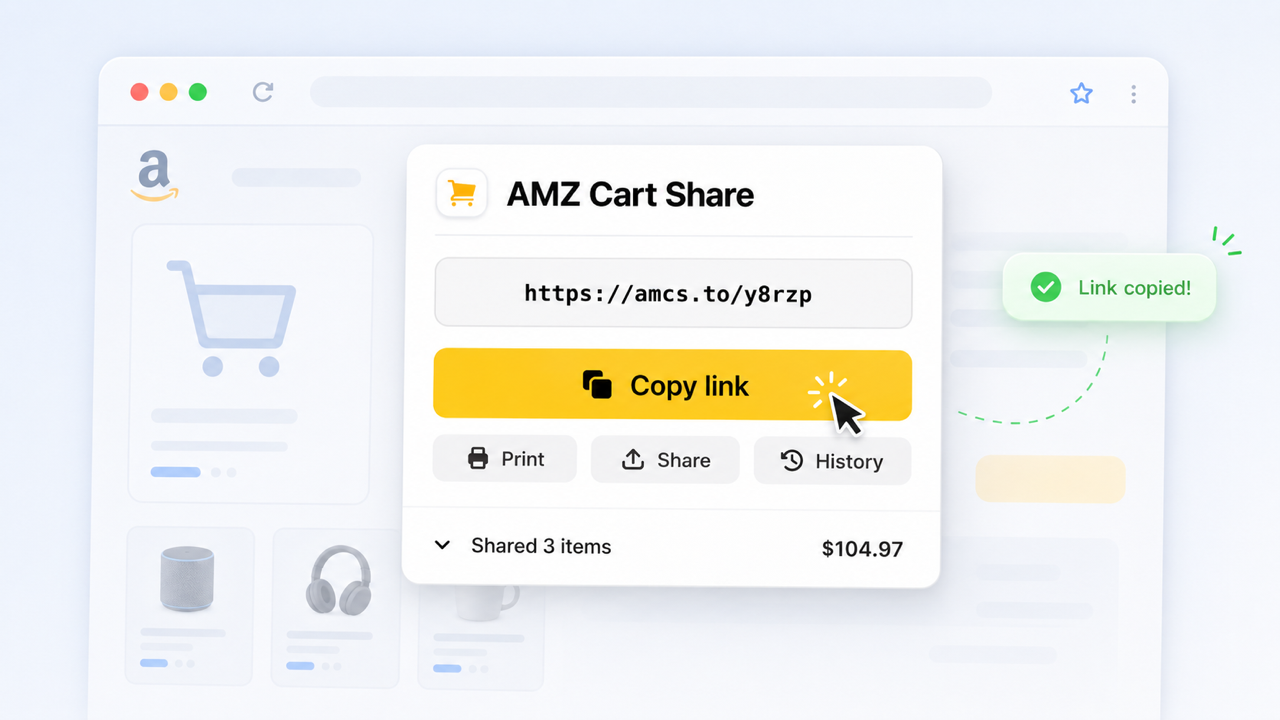
Share your entire Amazon cart as a link, and send it to your school admin staff, with AMZ Cart Share.
Just add your classroom supplies to your Amazon cart, create your shareable cart link with the AMZ Cart Share extension, then send your link to the person handling purchasing.
The link includes all the items in your cart, and correct quantities. Plus, the administrator does not need to install the extension to open your shared cart - they can click your link directly, saving them time and hassle.
Click here to install AMZ Cart Share for Chrome
Why teachers need a better way to share Amazon carts
School purchasing can often be a little awkward.
A teacher picks out the supplies they need, but someone else usually places the order.
That might be a school administrator, a purchasing coordinator, a finance or operations person, or some other admin staff member.
The annoying part is getting the exact cart from the teacher to the purchaser — copying individual Amazon product links sort of works when you only have one or two items. But once you’re trying to send a full classroom supplies list — books, pencils, headphones, art materials, folders, storage bins, and 12 packs of glue sticks — it gets messy quickly.
This happens a lot. In our analysis of 40,000+ carts shared with AMZ Cart Share, about 1 in 4 US carts was for a classroom, rising to nearly 3 in 10 during back-to-school in August. Sharpie markers, Elmer's glue sticks and #2 pencils are among the most-shared products of all.
See, there's just one problem:
Amazon does not make it especially easy to send a normal shopping cart to someone else.
Sure, you can copy product links manually. You can create a Wishlist. You can manually track everything in a spreadsheet. But if what you really want is “here’s my cart, please order these exact items”, those options are more work than they should be.
That’s where AMZ Cart Share helps. For a full overview of all the methods, check out our complete guide to sharing your Amazon cart.
Common school use cases
AMZ Cart Share works well for school situations where one person chooses the items, but another person reviews, approves, or purchases them.
For example:
- Classroom supplies — pencils, notebooks, markers, folders, paper, glue, scissors
- Books and reading materials — classroom sets, supplementary reading, reference books
- Activity and project materials — science kits, art supplies, craft supplies, poster board
- Tech accessories — headphones, charging cables, mouse pads, styluses, laptop sleeves
- Event supplies — graduation, end-of-year parties, classroom rewards, holiday activities
- Department purchases — when multiple teachers need supplies reviewed by one purchaser
The main benefit is simple: instead of sending a messy list of links, you send one cart link.
AMZ Cart Share handles carts with hundreds of items with ease - all in one link. Just imagine how long it would take to send that many items manually!
How to share an Amazon cart with a school administrator
1. Add your classroom items to your Amazon cart
Start by adding everything you need to your Amazon cart.
Before creating your link, double-check:
- The items are correct
- The quantities are correct
- You’ve removed anything personal from your cart
- You’re using the right Amazon store for your school, such as Amazon.com in the US
This is worth checking upfront, because your shared cart link reflects the cart when you create it.
2. Install the AMZ Cart Share extension
Install the free AMZ Cart Share extension for your browser.
AMZ Cart Share supports Chrome, Edge, and Firefox. You can start with the Chrome extension here:
Install AMZ Cart Share for Chrome
3. Open your Amazon cart
Go to your Amazon cart page.
This should be the cart containing the school supplies, classroom materials, or project items you want to send to your administrator.
4. Create your shareable cart link
Click the AMZ Cart Share extension icon in your browser.
If you don’t see it, click the puzzle-piece icon - 🧩 - in the top-right of Chrome to find your installed extensions.
AMZ Cart Share will automatically generate a shareable link containing the items in your cart, including the quantities you selected.
5. Send the link to your administrator or purchaser
Copy the link and send it wherever your school normally handles purchasing requests.
That might be via: email, Slack, Microsoft Teams, a purchasing request form, a shared planning document, or your school’s internal admin system.
When you send the link, you may also want to include a little bit of extra info for your administrator as context. Things like:
- Which class or grade it’s for
- What project, unit, or term the items are for
- When the items are needed
- And whether the order is urgent
If your school needs a file attached to the purchase request, you can also print the Amazon cart or save it as a PDF.
Some people even find AMZ Cart Share handy for sharing items with their fellow teaching staff. For instance, you might construct a cart of items for your science class, and then send it to the other science teachers at your school, ensuring you're all purchasing the same materials and resources.
What the administrator sees
The administrator does not need to install AMZ Cart Share.
When they open your link, they can view the items you shared and add them to their own Amazon cart. Here's an example cart page to give you an idea of what they'll see. They can review all items, then either proceed to adding & purchasing them all, or handle them one-by-one.
This makes the handoff much cleaner:
- The teacher chooses the items
- The cart link keeps the items together
- Quantities are included
- The administrator reviews the order
- The administrator purchases from their own / your school's Amazon account
This is especially useful when the school wants purchases to go through a central account, a school credit card, or a specific purchaser.
Why this is better than copying product links
Copying product links manually is fine for one or two items.
For a full classroom order, it gets old fast, and can quickly spiral into a messy collection of spreadsheets, email chains and forgotten items.
With AMZ Cart Share, the cart is the list.
You build the order once in Amazon, then send it as one link. Everything is self-contained and there's no risk of items getting missed or forgotten.
AMZ Cart Share vs Amazon Wishlist for school supplies
Amazon Wishlists are an alternative method for sharing Amazon items. While useful, they’re not always the best fit for school purchasing.
They’re better when you want an ongoing list of items that people can browse over time. For example, a classroom donation list or a general “items we’d love to receive” list. They're also more manual to setup and add/remove from.
AMZ Cart Share is better when you’ve already built a specific cart and want someone else to review or purchase it.
| Feature | AMZ Cart Share | Amazon Wishlist |
|---|---|---|
| Shares your existing Amazon cart | Yes | No |
| Keeps item quantities included | Yes | Limited / not as cart-like |
| Best for one-time purchase requests | Yes | Not usually |
| Good for ongoing donation lists | Not really | Yes |
| Recipient needs to install something | No | No |
| Useful for school approval workflows | Yes | Sometimes |
If you want to send a ready-to-order cart to an administrator, AMZ Cart Share is usually the cleaner option.
AMZ Cart Share vs Amazon Business
Amazon Business is Amazon’s more formal purchasing setup for organizations. It can be a good fit for schools, districts, and businesses that want centralized accounts, multi-user access, purchasing controls, and more structured procurement workflows.
Amazon Business accounts can be created for free, while Business Prime plans add extra business features and can cost more depending on the size of your organization.
If your school already uses Amazon Business properly, you may not need AMZ Cart Share for every order.
But plenty of school purchasing is more lightweight than that.
AMZ Cart Share is useful when:
- Your school does not use Amazon Business
- You need a quick, simple cart handoff, rather than a heavyweight system
- You want to avoid copying product links into a spreadsheet
- You want the purchaser to receive the exact items and quantities
Think of AMZ Cart Share as a simple cart-sharing tool. It's not trying to be a full procurement system, just a simple way to share self-contained carts of items around.
When not to use AMZ Cart Share
AMZ Cart Share is great for sending a prepared cart to another person.
It may not be the right tool if:
- Your school requires all purchases to go through Amazon Business
- You need a formal purchase order before adding items to Amazon
- You need multiple approval levels inside Amazon itself
- You want a public donation list that stays live for months
- You want other people to collaboratively edit the list
For those situations, Amazon Business, Amazon Lists, or your school’s internal purchasing system may be a better fit.
But for the common teacher-to-administrator workflow, “I've picked the items, can you please order them?”, AMZ Cart Share keeps things simple.
Is AMZ Cart Share safe for schools to use?
AMZ Cart Share is designed to do one simple thing: turn the items in your Amazon cart into a shareable link.
The extension is designed with privacy & security in mind, and only accesses to your Amazon cart page to read the items and quantities from your cart. It does not give the recipient access to your Amazon account, or anything else in your Amazon account.
AMZ Cart Share is featured on the Chrome Web Store, where it is used by 12,000+ shoppers, and rated 4.4/5.
It’s trusted by shoppers, teachers, staff, and teams across 500+ schools and businesses, including large US schools like Arizona State University and University of Illinois ECE.
FAQ
Can teachers share an Amazon cart with a school administrator?
Yes. Teachers can use AMZ Cart Share to create a shareable link from their Amazon cart, then send that link to a school administrator, principal, office manager, purchaser, or even their fellow teachers.
The receiver can open the link and add the shared items to their own Amazon cart, and then purchase them in bulk.
Does the administrator need to install the extension?
No.
Only the person creating the cart link needs the AMZ Cart Share extension. The person receiving the link does not need to install anything.
Are item quantities included?
Yes.
If your Amazon cart has 10 notebooks, 4 packs of markers, and 2 boxes of folders, those quantities are included when you create your AMZ Cart Share link.
Can I change my cart after sending the link?
Your shared cart link does not automatically update.
If you change your Amazon cart after creating the link, generate a new AMZ Cart Share link and send the updated version.
Can the administrator remove or change items before purchasing?
The administrator purchases from their own Amazon cart, so they can review the items before checkout.
If they need to make changes, they can adjust the order from their own cart after opening your shared link.
Can multiple teachers send carts to the same administrator?
Yes.
Each teacher can create their own AMZ Cart Share link and send it to the administrator. For clarity, it’s usually best to include the teacher name, class, grade, or project in the message alongside the link.
Is AMZ Cart Share a purchasing approval system?
No.
AMZ Cart Share is not a full procurement or approval system. It does not approve orders, track budgets, or replace your school’s purchasing rules.
It simply helps teachers send an exact Amazon cart to the person who places the order.
Is AMZ Cart Share free?
Yes. AMZ Cart Share is free to install and use.
What browsers does AMZ Cart Share support?
AMZ Cart Share supports Chrome, Edge, and Firefox.
You can visit the extensions page to install the right version for your browser.
Related guides
- How to share an Amazon cart, 2026 Guide
- How to print your Amazon cart
- How to share your Amazon cart by email
- Amazon cart sharing for businesses and office purchases
- Amazon cart sharing for families and relatives
- AMZ Cart Share — Amazon cart share extension
About the Author
🙋♂️ Harrison Broadbent
Harrison is the founder/creator of AMZ Cart Share, a Chrome extension used by 12,000+ Amazon shoppers, schools, and businesses to share Amazon carts as links. He writes about ways to share, organize, and collaborate using shared Amazon shopping carts.
First published on 27th May, 2026