How to Share a Whole Foods Cart on Amazon (2026)
TL;DR: Install AMZ Cart Share → Open your Whole Foods cart → Click the extension → Send your link. Your entire Whole Foods cart shared quickly and easily.
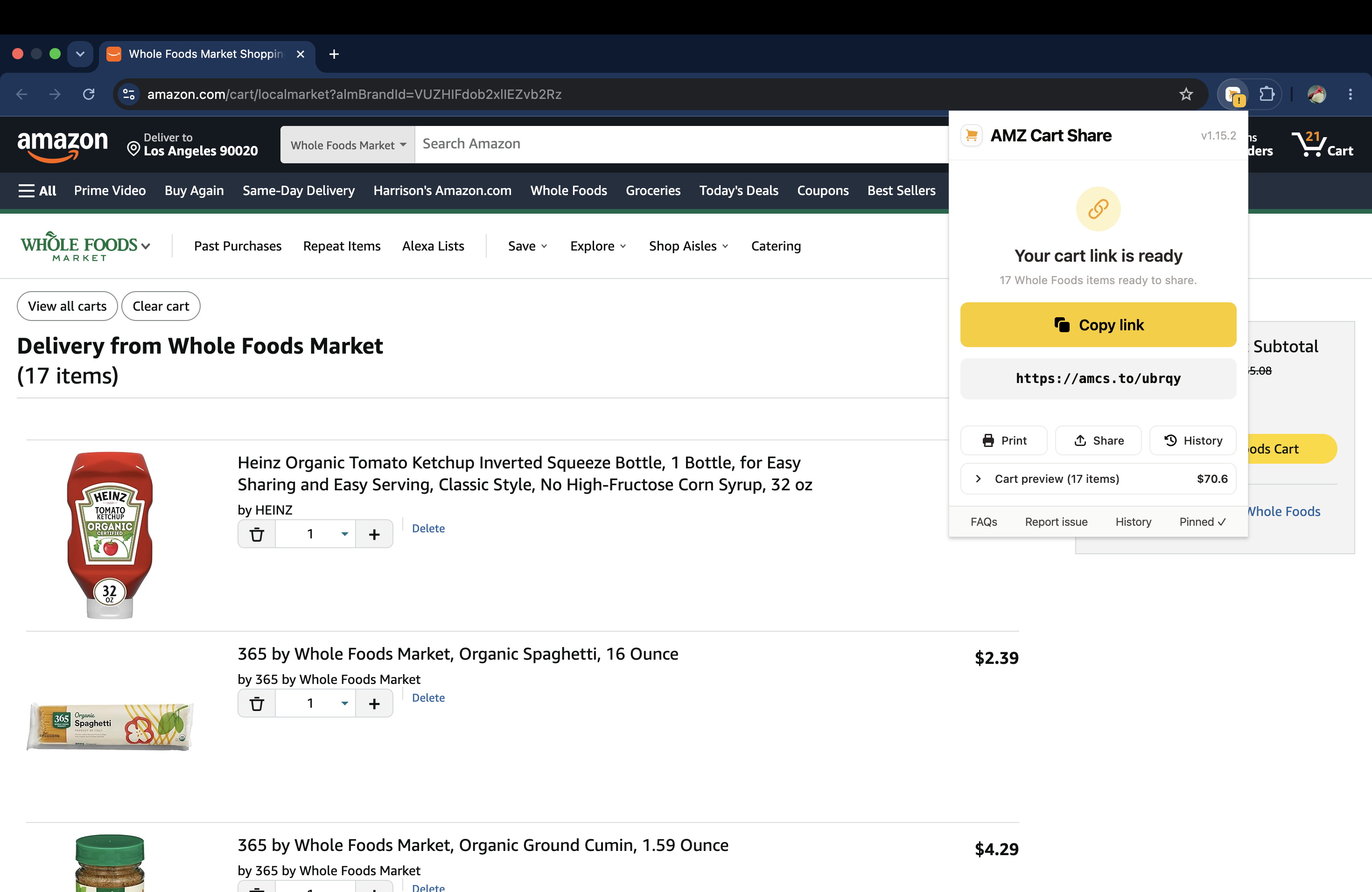
Share your Amazon Whole Foods cart as a link using the AMZ Cart Share extension.
If you order groceries through Whole Foods on Amazon, you might want to share your cart with a partner, a roommate, or someone who's picking up the order for you. The catch is that Amazon doesn't have a built-in way to share a Whole Foods cart.
AMZ Cart Share now supports Whole Foods carts. With our free browser extension, you can create a shareable link to your entire Whole Foods cart in 1-click, and send it to anyone. The recipient can then add all your items to their own cart without needing to install anything.
How Whole Foods Ordering Works on Amazon
Whole Foods delivery and pickup is available through Amazon in select areas. You shop on Amazon, but your items are fulfilled by your local Whole Foods store.
The important thing to know is that your Whole Foods cart is separate from your regular Amazon cart. That's why standard cart-sharing methods don't always work for Whole Foods orders, and you need an extension like AMZ Cart Share that specifically handles Whole Foods carts.
How to Share Your Whole Foods Cart
Sharing your Whole Foods cart with AMZ Cart Share works the same way as sharing a regular Amazon cart. Here's how:
- Install AMZ Cart Share. Add the extension to your browser from the Chrome Web Store, or view extensions for other browsers (Edge & Firefox supported too).
- Open your Whole Foods cart. Navigate to your Whole Foods cart on Amazon and click the AMZ Cart Share extension icon (top-right of your browser, click the puzzle icon if you don't see it). The extension will grab all your Whole Foods items and their quantities.
- Share your link. Copy the shareable cart link and send it to whoever you'd like. When they click your link, they can see all your shared items and add them to their own cart in 1-click.
Done! The whole process takes less than a minute.
Why Share Your Whole Foods Cart?
Here are a few situations where sharing your Whole Foods cart comes in handy:
- Coordinating with your household. Share your Whole Foods cart with a partner or spouse before placing the order, so they can check the list and add anything you missed.
- Sharing specialty finds. Found a great selection of organic products or specialty items at Whole Foods? Share your cart with a friend who shops there too.
- Splitting grocery runs. If you and a roommate take turns ordering groceries, sharing your Whole Foods cart makes it simple to share the load.
- Delegating the order. Build your cart and send the link to someone who can place the order or pick it up for you. This can also work well for helping elderly family members order food for themselves.
FAQ
Does the recipient need to install AMZ Cart Share?
No. The person you share your link with can view and add your shared items without installing anything. They just click the link.
Can I share both my regular Amazon cart and my Whole Foods cart?
Yes. AMZ Cart Share supports regular Amazon carts, Amazon Fresh carts, and Whole Foods carts. You can share whichever cart you have open.
What about Amazon Fresh carts?
AMZ Cart Share supports Amazon Fresh carts too. Check out our other guide - How to Share an Amazon Fresh Cart.
What browsers does AMZ Cart Share support?
AMZ Cart Share works on Chrome, Edge, and Firefox. Visit our Extensions page to install the right version for your browser.
Conclusion
Sharing your Whole Foods cart on Amazon is quick and easy with AMZ Cart Share. Just install the extension, open your Whole Foods cart, and generate a shareable link. It's completely free, and the person you share with doesn't need to install anything.
Related Guides
- Best Amazon Cart Sharing Extensions in 2026
- How to Share an Amazon Cart in 30 Seconds (2026)
- How to Share an Amazon Cart on iPhone or Android
- How to Share an Amazon Fresh Cart
About the Author
🙋♂️ Harrison Broadbent
Harrison is the founder/creator of AMZ Cart Share, a Chrome extension used by 12,000+ Amazon shoppers, schools, and businesses to share Amazon carts as links. He writes about ways to share, organize, and collaborate using shared Amazon shopping carts.